Categories
Books Reviews Social anxiety

Dancing with Reviews

Apologies. There is no Word tip today. I’ve been too busy with my new book. Next week…

Cultivating a Fuji is only two days old and already there are several reviews. That’s because of the blog tour organised by Rachel’s Random Resources – a very worthy resource.

What pleases me most about all the reviews so far is that the reviewers understood what I was trying to do with this novel… well, almost.

Here’s a table of the reviews so far:

Website Date Quotes
The Bookwormery 15th May [I] found it to be a moving description of social anxiety and just how traumatic a simple meeting can be for sufferers….yes there’s humour, but I found this to be a sad, poignant and thought provoking tale.
FNM 15th May This is a book that is guaranteed to stay with you long after you read it, it is a book that really makes you think with a few surprises along the way.
Jan’s Book Buzz 15th May Drori tells a story that can only come from a place of empathy and recognition. It says: “I know you. I see you. I hear you. I understand you.”
Cheryl M-M’s Book Blog 15th May I think the way Drori went about this was thought provoking. It’s a stage with Martin smack bang in the middle with a spotlight on him.
In de Boekenkast 16th May Cultivating a Fuji is a very touching story about how hard it can be to fit in the crowd. Martin’s character is well-developed and even the minor personalities have their own past and problems in this wonderful story.

One of them has a question I’d like to ponder over.

This review and this review (because it’s on WordPress and Blogger) says, “Drori approaches the topic of social anxiety from the perspective of an outsider, someone living without anxiety, which is an interesting way to go about it.”

Martin does have a voice. It’s true that the novel begins with the views of those around him, but Martin’s thoughts and feelings are there, too.

Cheryl goes on to say, “I wonder if the author decided to approach it this way in an attempt to get more readers or people to relate, and in doing so have a better understanding of social anxiety and how our actions can have an impact on the lives of others.”

I did have something like that in mind. I wanted readers who had met someone like Martin to recognise what they might have thought about him before trying to understand how Martin feels.

But Martin’s point of view comes out strongly, and suggestions that he doesn’t have feelings are raised and refuted by characters in the novel and shown to be false by Martin himself.

Cultivating a Fuji by Miriam Drori


Categories
Books The writing process

I’m a Naughty Girl

I'm a Naughty Girl

It’s time to admit it. I broke three rules. Yes, three rules of writing, possibly more. And all in one book: Cultivating a Fuji, out tomorrow. Here are the rules:

  • Minor characters don’t have backstories.
  • Always begin with something exciting that draws the reader in.
  • No head-hopping.

BUT rules can be broken, as long as the writer understands the rules and breaks them knowingly. What do I mean?

Minor characters don’t have backstories

In this story, it was important to me for readers to understand these characters. I didn’t want readers to view them simply as villains who mistreat Martin. They are all people with lives of their own. Like most of us, their minds are mostly occupied by their own problems. When they encounter Martin, we need to remember that they don’t have the emotional space to handle such an alien character. And sometimes, something in a minor character’s life causes them to act in a positive way.

Fortunately, the first two reviewers liked the fact that minor characters are developed.

Always begin with something exciting that draws the reader in

This simply didn’t work. When I tried rearranging scenes to accomplish this, I found myself breaking a different rule: The main character’s point of view should come first. I think the story begins in an interesting way, but it’s not exciting because it’s reflective. Martin begins by looking back on his life.

No head-hopping

This is an important rule. When a writer doesn’t understand this rule, changes in point of view can be frustrating for a reader. But if done properly, it can work well. Virginia Woolf accomplished this in To the Lighthouse. In Cultivating a Fuji, there is one chapter in which two people meet, and it’s important to know what each of them is thinking. I think I got it right.

There. I’ve admitted to my misdemeanours. I hope you agree they were in a good cause!

Cultivating a Fuji - Front Cover~~~~~~~~~~~~~~~~~~~~~~~~~~~~~~~~~~~

CULTIVATING A FUJI is released tomorrow, Wednesday, 15th May, but there’s no need to wait. This is what you can do now:

Categories
Books Bullying Social anxiety

Body Image and Mental Health


bodyimage_twitter_image_1200x675_yellow

In the UK, today is the start of Mental Health Awareness Week, and this year’s theme is: body image.

I know, mostly through meeting social anxiety sufferers online, that body image is huge among the causes or aggravators of social anxiety. People worry that they’re too tall, too short, too thin, too fat, too ugly. It doesn’t matter if these self-perceptions are true; they’re very real for their owners. For people with social anxiety, poor body image is another reason – sometimes the main reason – for them to cover up and hide themselves as much as possible.

And yet, there are other people who are just as tall, short, etc., who are happy with their bodies. Eurovision viewers are about to get another look at Netta, who seems perfectly content with hers.

Here’s a quote – from one of the many who kindly agreed for their words to be published anonymously in my non-fiction book, Social Anxiety Revealed:

I was told I was funny looking, ugly and weird and people laughed at me and I haven’t been able to shake it off, no matter how hard I try. Deep down, I know I’m not ugly, but when I’m in social situations my mind completely changes and there are those doubts and comments that people have made to me creeping around, and I begin to think I’m the ugliest person there.

Martin, the main character in my new novel, Cultivating a Fuji, doesn’t worry about the way he looks. He might have scolded himself for wearing the wrong clothes at a party, but he’s presumably fine with his body, because it’s not something he thinks about. The reason for that is probably that body image is not one of the things he was teased about at school.

For the person quoted above, it probably did start at school. Children can keep laughing at the victim for something that isn’t true, with no idea that this often causes poor self-image that can last for the rest of the victim’s life. This is why adults, who hopefully know better, need to intervene.

Cultivating a Fuji - Front Cover~~~~~~~~~~~~~~~~~~~~~~~~~~~~~~~~~~~

CULTIVATING A FUJI is released this Wednesday, 15th May, but there’s no need to wait. This is what you can do now:

Categories
Books The writing process

Word Tip 5: How Not to Indent a Line

Microsoft Word Tips for Authors

Welcome to the next in a series of tips on using Microsoft Word, geared towards authors.
Most Word advice is rather complicated and full of things you’ll never need to know.
I shall do my best to keep it simple, because you’re not stupid… just busy.
Please note: 
– Not all versions of Word are the same, but most are near enough.
– There are different ways of doing the same thing. I shall demonstrate just one (or two).

Your next line is the start of a new paragraph and you’ve decided you want the first line of the paragraph to begin further in from the margin… indented. So you press the space bar a few times and the paragraph’s first line is indeed indented.

Shocked

No! That would have been fine on a typewriter. But nowadays we use fonts that have proportional spacing. We might change fonts in a document. The space taken up by six spaces at the beginning of one line might not be the same as the space taken up by six spaces at the beginning of a different line. You’ll struggle and fail to line up your indentations. Your document will look messy.

A better method is to press the Tab button. That will jump to the same place every time, providing that all tabs are defined the same way for all your paragraphs.

An even better method is to modify the style, which, unless you’ve changed it, is called the Normal style. Here’s how:

  1. With the cursor on a paragraph, click the little arrow in the bottom right corner of Home → Styles.
  2. Hover over Normal in the Styles box and click the arrow that appears.
  3. Click Modify.
  4. Click Format → Paragraph.
  5. Click Indents and Spacing
  6. Click the arrow under Special: and choose First line.
  7. Under By:, set the amount of space you want to leave on the first line of each paragraph. (Mine is set to 1.27 cm.)
  8. Click OK twice.

Every Normal paragraph will have its first line indented by the amount you defined.

Next week we’ll look at Track Changes and Compare.

Questions and suggestions for future topics are welcome in the comments below.

Links to Previous Word Tips

  • Tip 1: A Matter of Style
    About heading styles.
  • Tip 2: Make Your Novel a Trampoline
    How to jump swiftly and gracefully between chapters.
  • Tip 3: That’s Not What I Wrote
    How to stop Word making changes you don’t want.
  • Tip 4: How Not to Jump to a New Page
    Press Enter until a new page appears? Please don’t.
Categories
Books The writing process

Word Tip 4: How Not to Jump to a New Page

Microsoft Word Tips for Authors

Welcome to the next in a series of tips on using Microsoft Word, geared towards authors.
Most Word advice is rather complicated and full of things you’ll never need to know.
I shall do my best to keep it simple, because you’re not stupid… just busy.
Please note: 
– Not all versions of Word are the same, but most are near enough.
– There are different ways of doing the same thing. I shall demonstrate just one (or two).

You’ve reached the end of a Chapter 1. You want Chapter 2 to begin on a new page. So you keep pressing Enter until, lo and behold, “Chapter 2” is on the next page.

Shocked

No! Don’t do it! Here’s why:

Every time a change is made in Chapter 1 that affects the number of lines in the chapter, Chapter 2 will no longer appear at the top of the next page. If you’ve done this for every chapter in the novel, you’ll have to go through the document correcting the number of Enters before each new chapter.

What should you do instead? I’m going to mention two methods.

Method 1

Word Show-Hide Button
Show/Hide button

Choose Insert and then Page Break (or just press Ctrl/Enter). This jumps to the next page, solving the problem. But you can’t see the page break unless you press the Show/Hide button on the Home tab. This means you (or someone else) might inadvertently add something before the page break that should go after, or vice versa. This is why I prefer…


Method 2

Remember the styles I mentioned in Tip #1? If you defined your chapter headings with Heading 1 style, you can define the Heading 1 style to always begin on a new page. Here’s how:

  1. With the cursor on a chapter heading, click the little arrow in the bottom right corner of HomeStyles.
  2. Hover over Heading 1 in the Styles box and click the arrow that appears.
  3. Click Modify.
  4. Click FormatParagraph.
  5. Click Line and Page Breaks and then Page break before.
  6. Click OK twice.

Every Heading 1 paragraph will now appear at the top of a new page.

Of course, while you’re doing that, you might find other Heading 1 definitions to change.

Method 2 might look longer than Method 1, but you only have to do this once in order to make every chapter heading start on a new page.

Questions and suggestions for future topics are welcome in the comments below.

Links to Previous Word Tips

  • Tip 1: A Matter of Style
    About heading styles.
  • Tip 2: Make Your Novel a Trampoline
    How to jump swiftly and gracefully between chapters.
  • Tip 3: That’s Not What I Wrote
    How to stop Word making changes you don’t want.
Categories
Books Holidays

Cherry Blossom

Cherry Blossom
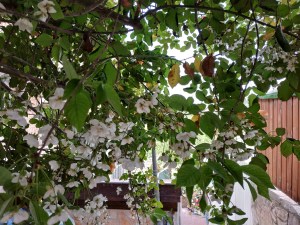
Cherry blossom in Jerusalem (not as colourful as in Japan, but still pretty)

The Philosopher’s Path in Kyoto, Japan is renowned for the cherry blossom that adorns the cherry trees that line its route.

Martin and Fiona get to visit it towards the end of their story, but they have to imagine the blossom. It’s autumn, not spring.

My husband and I also enjoyed our walk along this path, five years ago, in autumn. We didn’t see the cherry blossom either, but we did get to taste a Fuji apple on our trip. Martin and Fiona also experience the sweet, juicy taste of a Fuji apple.

Why am I telling you all this? Read my novel to find out.

Cultivating a Fuji - Front Cover

May 15, 2019 is Launch Day.

.

CULTIVATING A FUJI is released on 15th May, but there’s no need to wait.

Categories
Books The writing process

Word Tip 3: That’s Not What I Wrote

Microsoft Word Tips for AuthorsWelcome to the next in a series of tips on using Microsoft Word, geared towards authors.
Most Word advice is rather complicated and full of things you’ll never need to know.
I shall do my best to keep it simple, because you’re not stupid… just busy.
Please note: 
– Not all versions of Word are the same, but most are near enough.
– There are different ways of doing the same thing. I shall demonstrate just one (or two).

Sometimes the text in your Word document doesn’t look the same as what you typed.

I’m not talking about typos. We all make those occasionally. I’m talking about words that Word changes off its own bat. Microsoft calls this AutoCorrect. The idea is that it can change some of your typos and spelling mistakes automatically, because it knows better than you what you meant to write, or it thinks it does.

What if it doesn’t? What if you wanted to make up a word in your novel? What if your character talks funny and you wanna show some of her peculiar jargon, ini’? You don’t want Word to automatically change any of your carefully-chosen quirks, do you?

Personally, I know of very few words that I want Word to change automatically. I don’t mind seeing squiggly lines around my novel, but I think, apart from rare cases, making automatic changes is a step too far.

How do you stop Word making automatic changes?

Choose the following sequence of options:

File –> Options –> Proofing –> AutoCorrect Options… –> AutoCorrect

There’s a box called Replace text as you type. You can untick (uncheck) it. Then Word won’t change anything automatically. But what if certain automatic changes might be useful?

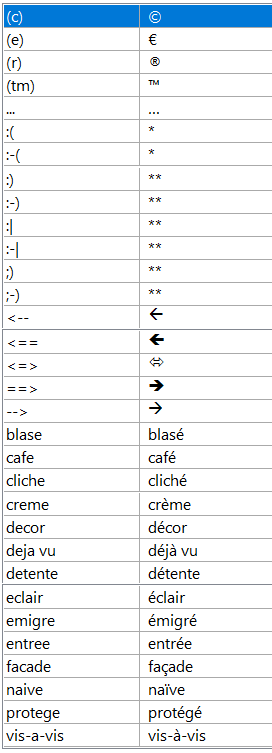
I decided to keep that box ticked (checked) and delete most of the strings it was changing. These are the ones I kept:

MS Word AutoCorrect Items

Questions and suggestions for future topics are welcome in the comments below.

Links to Previous Word Tips

  • Tip 1: A Matter of Style
    About heading styles.
  • Tip 2: Make Your Novel a Trampoline
    How to jump swiftly and gracefully between chapters.
Categories
Books

Cover Reveal


Curtains

With everything that’s been going on… promoting the free day for Social Anxiety Revealed and lots more – bookwise and lifewise… I somehow omitted, on this blog, to announce the fabulous cover for my new novel, Cultivating a Fuji, to be released on 15th May.

Crooked Cat have created a masterpiece with this cover.

So, without further ado…

except for a crescendoing drum roll…

and a blast from the trumpet…

I present the amazing cover of Cultivating a Fuji.

Cultivating a Fuji - Front Cover

Categories
Books Social anxiety The writing process

What Not How

The other day, I tweeted the following:

You don’t have to remember how. You only have to remember what.

It was in reply to this, from @jamesgarside_:

People: How do I [do thing] on computer?
Me: *googles how to [do thing] and shows them*
People: Well, I could have just googled that!
Me: But you didn’t. You asked me.
People: YOU should know how to do it without searching for it first.
Me: You didn’t know how to do it at all!!!

The tweet contained an appropriate head-banging GIF.

I could definitely relate that to Microsoft Word. I think most authors use it, even though there is sophisticated software dedicated to writing novels. And most authors have no idea what Word can do – features that would help them immensely if only they knew about them. What, not how. Once you know that a thing is possible, you can find out how to make it happen. But if you don’t know it’s possible, you won’t think of searching, to discover how to make it happen.

Shocked SmileyImage by OpenClipart-Vectors from Pixabay

I was shocked to hear one author’s method of working with Word. She creates an Excel sheet with the starting and ending page numbers of each chapter, so that she can go directly to the chapter she wants to review. During (or after) every revision, she updates the Excel files with the new page numbers.

That would never work for me. I have so many revisions that I would never manage to keep the spreadsheet up to date. Fortunately, Word itself has a much simpler solution – one that doesn’t have mistakes because it’s built in.

Working with Word
Cropped screen shot of Cultivating a Fuji in Word

This is how Word looks as I’m working on a novel. Down the left-hand side is my list of chapters. I give the chapters names, even if the names won’t remain in the final version. That way, I know roughly what’s in each chapter. When I want to review a specific chapter, I click on the chapter in the list and Word jumps right there. So much simpler than going to a separate file, rembering a page number and then going to that page in the Word file.

Sometimes I divide the chapter into scenes by creating sub-headings, which also appear in the list. The sub-headings won’t be included in the final version of the novel, but they’re useful while it’s still being written/edited.

I might not remember exactly how to set this up without trying it out, first. I might even need to google it. But the main thing is that I know it’s possible. What, not how.

You don’t have to remember how. You only have to remember what.

Could that apply to other walks of life? What do you think?

~~~~~

News

To celebrate the forthcoming publication of my novel, Cultivating a Fuji, the ebook version of my non-fiction book, Social Anxiety Revealed, is completely free for one day only. Today. Do hurry to download it before time runs out…

Categories
Books SIM Talks with Miriam

SIM Talk 9: Joan Livingston

#SIMTalksWithMiriam

Misunderstandings are often fun… when you look at them from the outside or with hindsight. When they’re actually happening and you’re involved, they can be far from fun. Here’s Joan Livingston, whose third mystery in the Isabel Long series is due out next week (22nd March).

A Dangerous Misunderstanding

Sometimes words get in the way of what people are trying to say. That happens with several of my characters. And because I write mysteries it can get them into trouble.
Joan LivingstonLet me tell you about Isabel Long, the protagonist in my mystery series who is a former journalist turned amateur P.I. solving cold cases. In Redneck’s Revenge, the second in this series, Isabel gets herself into a sticky situation while interviewing Gary and Larry Beaumont in their dump of a home. The brothers are notorious drug dealers and suspects in the death of a junkyard dealer. And Isabel is brave enough to dig deeper in her line of questioning.

Ah, but she hits a nerve because she’s dealing with a couple of hotheads who don’t listen very well. They have a tendency to jump to conclusions. And being new to the P.I. game, Isabel is still learning how to deal with people like the Beaumonts.

Here’s part of that scene from Redneck’s Revenge. She is meeting them at their house.

“If I’m hearing correctly, you two don’t have alibis for that night,” I say. “Right?”

I believe I just stepped into it big time because Gary and Larry’s foreheads clamp so hard their brows hang heavy over their bloodshot eyes. Their lips curl.

Larry slaps his brother’s arm.

“What’s she mean?” he asks.

“It means she’s callin’ us liars,” Gary answers.

I speak up.

“I didn’t call you liars.” I try to make my voice as warm as I can muster given how nervous I am. “What I said is that you can’t account for your whereabouts the night Chet Waters was killed.”

Gary’s fist hits the table.

“You bitch, what makes you think we’d have anythin’ to do with that?”

Yes, Isabel manages to get out of there unharmed, but she is rather shaken because she really felt in danger.
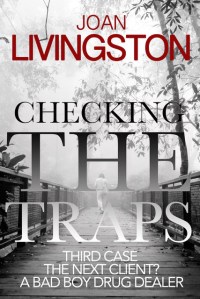
Checking the TrapsI’m not going to spoil what happens later in this book, but fast forward to the third, Checking the Traps. Yes, the Beaumont brothers return. Gary, the alpha brother, wants Isabel to find out what happened to their half-brother, Cary. Did he jump from a bridge known for suicides, or was he pushed, like Gary thinks?

Isabel takes the case, largely because she is interested in the victim, who was a highway worker by day and a poet at night. But she decides to be upfront with the Beaumonts, particularly, Gary, who is the alpha brother. She wants to avoid any misunderstandings this time.

“He was just a regular guy.”

“Uh, Gary, you gotta do better than that. I’m gonna need as much information as possible. By the way, if we proceed, I might ask some tough questions that’ll make you uncomfortable, and I don’t want you getting all pissed off at me like you did once before. Remember?”

Gary puckers his mouth. He’s thinking about that time at his home when he and his brother scared the bejesus out of me because they thought I called them liars. It was a misunderstanding on their part.

“Okay, okay,” he says finally.

Yes, Isabel is learning.

About Checking the Traps

Isabel Long is a bit banged up from her last case with a broken collarbone and her arm in a sling. But that doesn’t stop her from pouring beer at the Rooster Bar or taking her third case with Gary Beaumont, a local drug dealer who once terrorized her. Gary is convinced his brother didn’t jump off a bridge known for suicides. Somebody pushed him.

Gary’s brother was a boozer who drove for a highway crew. But what interests Isabel and her ‘Watson’ — her 93-year-old mother who lives with her — is that the man wrote poetry.

The chief suspects are one of Gary’s business associates and a famous poet who plagiarized his brother’s poetry for an award-winning book. Yes, he was that good.

As a journalist, Isabel did regular meetups with her sources for stories. She called it checking the traps. She does the same as a private investigator, and this time, she’ll make sure she doesn’t get caught in one.

About Joan Livingston

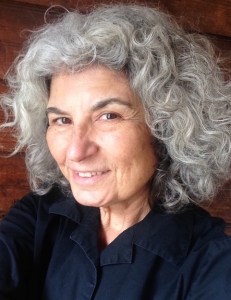
Joan Livingston is the author of novels for adult and young readers. Checking the Traps, published by Crooked Cat Books, is the third in the mystery series featuring Isabel Long, a longtime journalist who becomes an amateur P.I. The first two are Chasing the Case and Redneck’s Revenge.

An award-winning journalist, she started as a reporter covering the hilltowns of Western Massachusetts. She was an editor, columnist, and the managing editor of The Taos News, which won numerous state and national awards during her tenure. Recently, she was named editor of the Greenfield Recorder.

After living eleven years in New Mexico, she has returned to rural Western Massachusetts, which is the setting of much of her adult fiction, including the Isabel Long Mystery Series.

Links to Joan and her Books

Website, Facebook, Twitter, Instagram, Goodreads

~~~

Is this the last of the series?

There have been some wonderful articles in this series. Some guest posters have opened up on difficult topics. But now, if no one else wants to volunteer, I might close it, either temporarily or permanently. You’re still welcome, however, to suggest a topic for a guest post.

Do you want to write (or talk) about one or more of the SIM topics – Social anxiety, Israel, Misunderstandings? The details are here.